In short
The fastest way to get guests to look at your TV is to let them play on it. With PlainSignage the screen shows a QR code, guests scan it and play on their own phone — no app, no controller — while the TV shows the live leaderboard, results or photos. Seven games are included in the single €14.99/month plan: Stop the clock, Wheel of fortune, Live poll, Song requests, Smiley feedback, Quiz with phones as controllers, and Photo wall.
Why games beat a looping promo video
A TV in a bar competes with phones, friends and the drink in front of people. A looping advert loses that fight in seconds. A game flips it: the phone becomes the controller and the TV becomes the scoreboard everyone is watching. Guests stay longer, order another round while they wait for their turn, and post the result on social media for you.
All seven games below run through a QR code on the screen. Guests open a mobile page in their browser — nothing to install — and the digital signage screen updates within seconds. Every game is included in the one plan; there are no add-ons or credits to buy.
- Setup per game: 2–5 minutes in the browser designer
- Works on any Android TV, Fire TV Stick or the browser player
- Guests need no app; codes rotate so only people in the room can join
1. Stop the clock
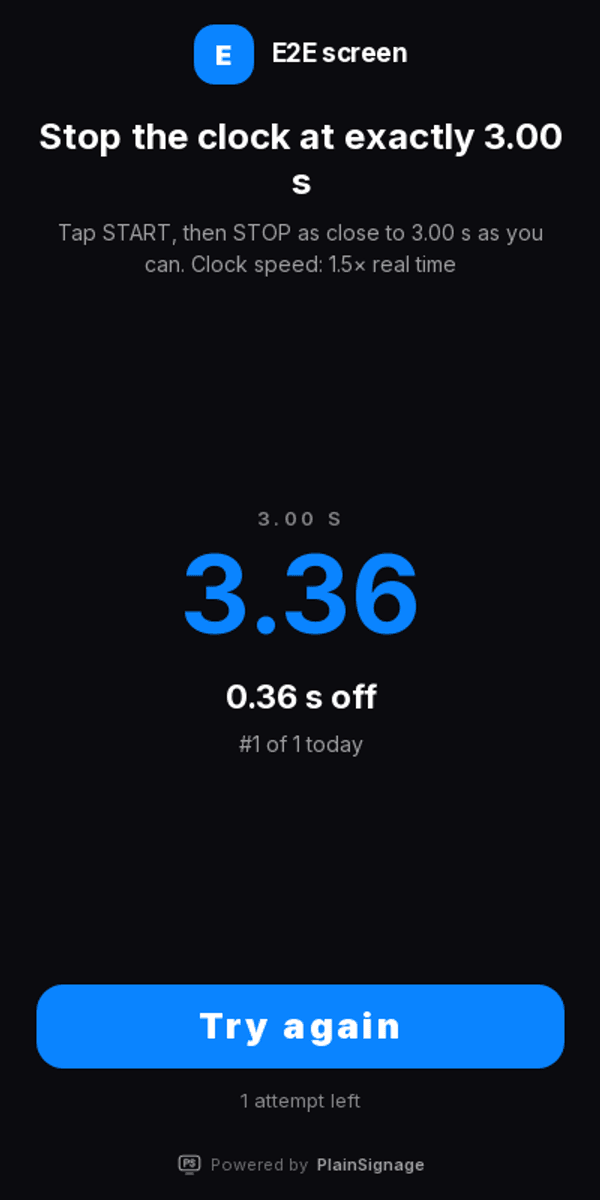
The screen shows a target, for example 10.00 seconds. Guests tap START on their phone and try to hit STOP at exactly that moment. The TV ranks every attempt with medals; a stop within 0.01 s shows PERFECT and the prize you set, and the phone tells the winner to show the screen to staff.
Difficulty is a fixed clock speed that everyone sees: ¾ speed for a family café, real speed for a normal evening, 1.5× or 2.5× faster for a competitive Friday. Timings are checked against the server, so nobody can fake a time. Limit attempts per phone (three a day is a good default) so the queue keeps moving.
- Setup: 3 minutes with the Stop the clock template
- Prize: a free coffee or dessert for PERFECT, a shot for the daily #1
- Tip: keep the target between 5 and 15 seconds
2. Wheel of fortune
The classic promo wheel, but the spin happens on the guest's phone and the wheel animates on the TV. Each segment is a prize or a “try again”, with a weight you control, so a 10% discount can be common and a free bottle rare. Winners get a code on their phone to show at the bar; you set spins per device and a cooldown so people don't farm prizes.
Because the Wheel of fortune logs every spin, you also know exactly how many prizes you gave away tonight.
- Setup: 5 minutes (type prizes, set weights)
- Prize: small and frequent works better than big and rare
- Tip: put “spin again” on two segments to keep the fun going
3. Live poll
Ask the room a question — “Which special should we run on Friday?” — and let the bars grow live on the TV as votes come in. One vote per phone, optional vote changes, and a reset window so tomorrow starts clean. Polls are the cheapest way to make guests feel heard, and the result is free market research.
The Live poll widget has bars, donut and tile designs; emoji options work great on a bar screen.
- Setup: 2 minutes
- Prize: none needed — announce the winning option the next day
- Tip: one question per evening; change it weekly
4. Song requests
Guests search a song in the catalogue, request it, and upvote what others requested. The TV shows the queue with what plays next; staff mark songs as played from the console. Moderation can hold requests until approved, and a profanity filter runs by default.
Note that Song requests is a request list, not a music player: you keep using the licensed music service you already have. That keeps you on the right side of the music rights organisations.
- Setup: 2 minutes
- Prize: the most-upvoted requester of the night gets a drink
- Tip: limit requests per hour per phone so one table can't take over
5. Smiley feedback
Four faces on the phone, a live satisfaction score on the TV. Guests rate their visit in two seconds, one vote per phone per day. Showing the score publicly is a small act of confidence that customers notice, and the trend over 30 days tells you more than any review site.
Smiley feedback is best on the screen near the exit or the toilets — the moment people decide how the visit went.
- Setup: 1 minute
- Prize: none; thank people on the phone after they vote
- Tip: watch the score by weekday to spot staffing problems
6. Quiz with phones as controllers
The TV is the stage, phones are the buzzers. Start a quiz from a built-in question bank in five languages or write your own; guests join with the QR and answer on their phone; the screen shows the countdown, the answers and the podium. It is the closest thing to a pub quiz that runs itself.
The Quiz & games widget also includes reaction and party games for tables that want to play against each other.
- Setup: 3 minutes with the built-in question bank
- Prize: a round for the winning table
- Tip: run it at a fixed time so regulars plan for it
7. Photo wall
Guests upload a photo from their phone and it appears on the TV as a polaroid, in a mosaic or as a slideshow — with your logo and moderation before anything goes live. It works at weddings, birthdays and any evening people are already taking pictures.
The Photo wall keeps the photos in your library afterwards, which is a gift for your social media the next day.
- Setup: 2 minutes; turn moderation on for public events
- Prize: the best photo of the night, chosen by the room with a poll
- Tip: add a hashtag to the screen so people post it themselves
Try it on your own TV
14-day free trial, no credit card. Your first screen is live in three minutes.
Putting it together: a game night on one screen
Build a playlist with three slides: Stop the clock (2 minutes), Live poll (1 minute) and Song requests (1 minute), looping. Add a second slide with the menu board so the promo still gets airtime. On a quiet night, switch the playlist to the Wheel of fortune only. All of it is one screen and one €14.99 subscription; a second screen at the entrance adds €4.99 — see pricing.
Games are popular in restaurants and bars and hotels, but the same setup runs in gyms, campsites and community halls.
Frequently asked questions
Do guests need to install an app?
No. The screen shows a QR code, the phone opens a web page, and the game runs in the browser. It works on iPhone and Android.
Can people cheat at Stop the clock?
Every attempt is checked against the server clock, and attempts per phone are limited. The clock speed is fixed per difficulty level and shown to everyone, so the game is fair.
Do I need a special TV?
Any Android TV, Google TV, Fire TV Stick or a laptop with a browser. Install the free player, enter the pairing code, and add a game slide.
How do prizes get claimed?
The phone shows the prize (and for the wheel a code) with a note to show it to staff. You decide what the prize is and how often it can be won.
Is music licensing an issue with song requests?
No. Song requests only manages the request list. Playback stays with your existing licensed music service.
How much does it cost?
All seven games are part of the single plan: €14.99 per month for the first screen and €4.99 per extra screen, with a 14-day free trial.